Most owners treat maintenance as a line item they can defer, but the cost of skipping it does not wait its turn. It shows up as lost rankings, a slow checkout, a breach notice, or a rebuild quote five times larger than a year of upkeep. This guide breaks down what neglect actually takes from a Malaysian business, and how to decide whether you handle upkeep yourself or hand it to a website maintenance services Malaysia team.
The cost of website neglect is rarely a single bill. It compounds across four fronts at once: lost search rankings, slower pages that bounce visitors, security holes that invite a breach, and technical debt that eventually forces a full rebuild. A site left unmaintained for twelve months typically needs a rebuild costing five to ten times what steady monthly upkeep would have cost.
None of it announces itself. By the time the damage is visible, you have usually been paying for it for months. That is what makes neglect expensive: it is invisible right up until it is not.
After years of inheriting neglected sites, the pattern is always the same: the owner did not decide to skip maintenance, they simply never decided to do it. The site launched, worked, and faded into the background. Nobody sets out to pay the cost of website neglect; they just never schedule the alternative.
Here is the uncomfortable truth we tell every client: the cheapest maintenance is the maintenance you never notice. If your upkeep is only visible when something breaks, you are already paying the neglect tax. And no, you do not always need a plan: a disciplined owner with the right skills and a free Saturday each month can keep a simple site healthy. Most owners are neither, which is the honest reason professional upkeep exists.

The Four Ways Website Neglect Quietly Costs You
The cost of website neglect lands on four fronts at once, and none of them arrive as an invoice you can point to. They surface as smaller sales, weaker rankings, a security scare, and eventually a rebuild you did not budget for. Here is what each one takes.
Conversions, per second lost
Every extra second of load time cuts conversions by around 7%. Old plugins and heavy media slow a site so gradually you never notice, until the quarter's numbers are down.
Mobile visitors who leave
Over half of mobile users abandon a site that takes more than three seconds to load. In mobile-first Malaysia, that is your main audience walking out.
Breach recovery, on the low end
Cleaning up a hacked WordPress site typically runs RM3,000 to RM15,000 and takes one to three weeks. Meanwhile searchers see a malware warning, not your business.
The rebuild multiplier
A site left to rot for twelve months usually needs a rebuild costing five to ten times a year of upkeep. Neglect does not just cause problems, it compounds them.
Read together, the point lands: neglect is not one risk you can weigh and accept, it is four running in parallel. That is the gap professional website support services are built to close.
What Website Maintenance Actually Covers
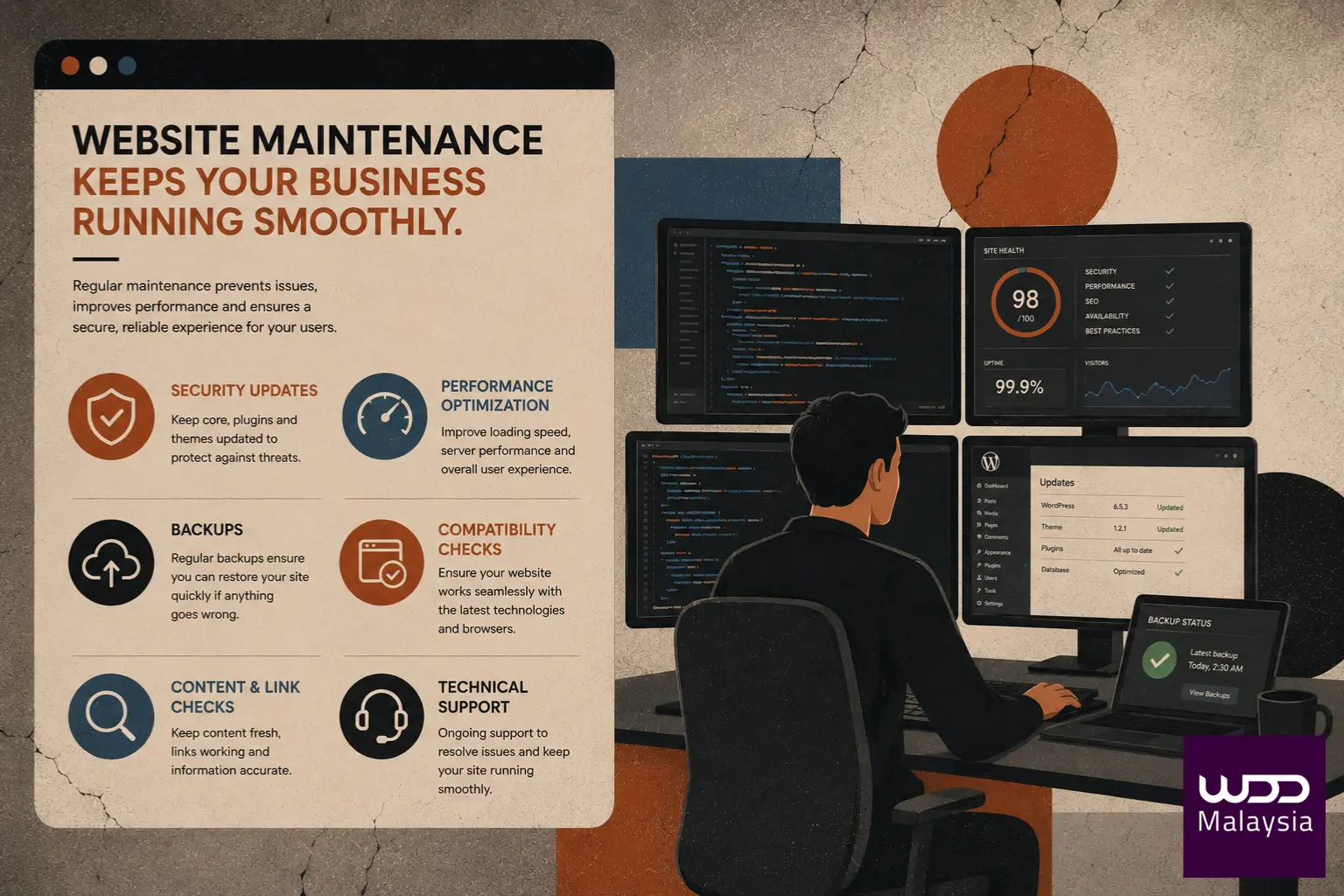
Website maintenance is the ongoing work of keeping a site secure, fast, and functional: updates, security monitoring, off-site backups, broken-link fixes, speed tuning, content refreshes, and uptime checks. The "update button" people picture is roughly 5% of the actual job. The rest never shows on the front end but keeps the whole thing standing.
Under those numbers sit six categories of work, almost none of it visible on the front end:
- Security and backups: daily off-site backups, malware scans, firewall monitoring, SSL renewals, and patching vulnerabilities the moment they are disclosed. This is where managed website security earns its place.
- Performance and speed: image compression, caching, code minification, database cleanup, and Core Web Vitals tuning.
- Technical updates: core, theme and plugin updates tested in staging first, so an update never takes you offline.
- SEO health checks: broken-link audits, meta reviews, sitemap submissions, schema validation, and Search Console monitoring.
- Content updates: refreshing prices, service info, team photos, and keeping legal pages current.
- Monitoring and reporting: 24/7 uptime tracking, error-log review, and a monthly report so you actually know what was done.

Your Real Risk Level, Measured by Your Last Update
Bots scan every WordPress site for known vulnerabilities, constantly. The question is never whether your site is probed, it is whether the probes find anything to exploit, and that depends almost entirely on how recently you patched. Here is where you likely sit.
Updated this week. You are protected against known vulnerabilities. Keep the cadence going and this stays a non-issue.
Updated this month. Newer exploits are starting to circulate against unpatched versions. Time to schedule your updates rather than defer them again.
Updated 3+ months ago. Multiple disclosed vulnerabilities almost certainly apply to your site. This needs attention now, not next quarter.
Updated 6+ months ago. Your site is effectively a target waiting to be hit. Assume you are exposed and act accordingly.
Under Malaysia's PDPA, businesses that handle customer data are expected to maintain reasonable security safeguards. A preventable breach caused by a neglected, unpatched flaw is, in practice, a due-diligence failure: it can trigger compliance scrutiny, erode customer trust, and cause reputational harm that takes years to undo. Documented, ongoing maintenance is one of the simplest ways to demonstrate reasonable care.

The Quiet SEO Penalty for Stale, Slow Sites
Google never emails you when your rankings start sliding. There is no alert saying a broken link cost you a position. It just happens, quietly, over weeks, and by the time you notice the traffic drop you have been falling for months. Much of what slides is measurable: Google's own Core Web Vitals track exactly the speed and stability that neglect degrades. Maintenance is what keeps you off the slide in the first place.
| What Google penalises | What maintenance does about it |
|---|---|
| Poor Core Web Vitals | Keeps LCP, CLS and INP scores green through regular speed tuning. |
| Broken internal links | Regular link audits kill 404s before they waste crawl budget. |
| Mobile usability errors | Catches tap-target and font-size issues under mobile-first indexing. |
| Stale content signals | Refreshes dates and information so pages are not deprioritised for fresher rivals. |
| Security warnings | Prevents the malware flags that remove a site from results entirely. |
| Outdated schema markup | Revalidates markup so you keep rich-result eligibility as standards change. |
If you are already investing in SEO services, skipping maintenance is like running ads to a leaking bucket: you pay to drive traffic to a site quietly surrendering the rankings you are paying to win.

The Monthly Website Maintenance Checklist Every Business Site Needs
Want to know whether your site is genuinely looked after? Tick each item your site actually gets and watch your score. If you cannot honestly tick most of them, your site is drifting into the neglect that costs you.
Your Maintenance Health Score
0 of 12Fewer than eight ticked regularly? Your site is below the safety line, which is precisely where the costs in section one begin to accrue.

DIY or Professional Maintenance? Answer Three Questions
There is no universal answer, only the right one for your situation. A capable owner with time can run upkeep on a simple site; a busy team on a revenue-critical site almost never should. Answer these three honestly and the sensible path becomes obvious.
The DIY-vs-Pro Decision
Pick one option per question. Your result appears at the bottom.

Stop Paying the Neglect Tax
If your site has not been properly maintained in the last 30 days, every week it drifts costs you a little more traffic, ranking and trust than the last. Here is where to go next.
Security, speed, updates, backups and reporting, handled by a team that tests in staging before anything touches your live site. Managed, Growth and Enterprise care plans.
Tell us about your site and we will scope the right level of care, from a one-time fix to a full managed plan. No lock-in tricks, and you keep your code and credentials.